Unaccompanied Housing (Barracks)
Navy Funded Free & Discounted Services
What is the free internet service?
What is the difference between the free/discounted internet service and the non-discounted Wi-Fi service?
- Criminal skills and hacking
- Illegal download sites
- Mature content (including self-harm)
- Gambling
- Nudity
- Pornography/sex
Can I get higher speeds with the free internet service?
What internet speeds can I get at the discounted rate?
- Navy-subsidized Monthly 60 Mbps - $18.74/mo (limited to 5 devices)
- Navy-subsidized Monthly 100 Mbps - $38.74/mo (limited to 5 devices)
NOTE: All speeds are “up to,” are not guaranteed, and will vary.
NS Guantanamo Bay, NAVBASE Guam, and NALF San Clemente Island speeds and pricing will vary.
What if I don't want to use the filtered internet service?
What non-discounted plans are available?
- Monthly 10 Mbps - $26.95/mo (limited to 1 device)
- Monthly 30 Mbps - $49.95/mo (limited to 3 devices)
- Monthly 60 Mbps - $59.95/mo (limited to 5 devices)
- Monthly 100 Mbps - $79.95/mo (limited to 5 devices)
- Week Pass 10 Mbps - $14.95/wk (limited to 1 device)
NOTE: All speeds are “up to,” are not guaranteed, and will vary.
NS Guantanamo Bay, NAVBASE Guam, and NALF San Clemente Island speeds and pricing will vary.
What if I have internet service through a different provider?
Plans & Services
How fast is the Internet service?
Which speed is best for me?
- Value (10 Mbps) - It's the simple life for me: browsing, social media and email on one device
- Enhanced (30 Mbps) - I love staying in touch with my friends/family: video conferencing, multiple devices
- Premium (60 Mbps) - Let me binge my shows/movies and play games: streaming; online gaming
- Extreme (100 Mbps) - Gaming is my life: faster downloads of games and updates
How much does the Internet service cost?
- Monthly 10 Mbps - $26.95/mo (limited to 1 device)
- Monthly 30 Mbps - $49.95/mo (limited to 3 devices)
- Monthly 60 Mbps - $59.95/mo (limited to 5 devices)
- Monthly 100 Mbps - $79.95/mo (limited to 5 devices)
- Week Pass 10 Mbps - $14.95/wk (limited to 1 device)
NOTE: All speeds are “up to,” are not guaranteed, and will vary.
NS Guantanamo Bay, NAVBASE Guam, and NALF San Clemente Island speeds and pricing will vary.
Are there any other fees or charges?
How many devices can I connect at a time?
Will my goWiFi account work at other bases?
Yes! You can use the same login on any goWiFi network on Naval Bases worldwide where Viasat provides service. For a current list of locations, select BASE LOCATIONS in the top menu, and then select the region and base to view the buildings that provide goWiFi service there.
NOTE: Service options may vary depending on location. If your account has an existing subscription and you stay at a guest lodging facility, you will be able to receive the highest speeds offered at the guest lodging facility, up to the speed of your current plan. As an example, if you have a 60 Mbps subscription plan and you log in at a guest lodging facility, you will receive the highest speed offered at the lodging facility, not to exceed the speed of your current subscription.
How can I view my current services?
How can I change my service?
To change your service, log in to MY ACCOUNT.
Select Plan in the main menu then click the CHANGE SERVICES button, remove any services you no longer want (if applicable) and click the CONTINUE button.
On the next screen, select the services you'd like to add (if applicable), and click the CONTINUE button.
You will need to log out and log back in on a connected device for your new speeds to take effect.
NOTE: Upgrades may have pro-rated charges and will take effect immediately. Downgrades will take effect on your next billing cycle.
How can I view pending changes to my service?
How do I cancel my subscription?
If you want to cancel your subscription but keep your account open for future use, you can cancel your subscription in MY ACCOUNT by selecting the Plan tab in the main menu. Then clicking the CANCEL SUBSCRIPTION button.
NOTE: By canceling only your service subscription, billing will stop, but your account will remain open for 90 days, and you will retain access for the period you've paid for. When you're ready to resume service, log in to MY ACCOUNT to select your services. If your account has been inactive for more than 90 days, it will be permanently closed. To purchase service again, please create a new account.
Billing
How can I see the summary of charges for my next bill?
How do I pay for service?
For accounts with subscriptions, we will automatically charge the payment method on file on the monthly anniversary of your signup date.
Accounts with on-demand plans are charged when the service is purchased.
What type of payment options are available?
How can I update my payment information?
Is my credit card information secure?
Will I receive a receipt when my credit card is charged?
How can I view my past billing statements?
How do I pause my billing?
NOTE: By canceling only your service subscription, billing will stop, but your account will remain open for 90 days, and you will retain access for the period you've paid for. When you're ready to resume service, log in to MY ACCOUNT to select your services. If your account has been inactive for more than 90 days, it will be permanently closed. To purchase service again, please create a new account.
Account Administration
Will my goWiFi account work at other bases?
NOTE: Service options may vary depending on location. If your account has an existing subscription and you stay at a guest lodging facility, you will be able to receive the highest speeds offered at the guest lodging facility, up to the speed of your current plan. As an example, if you have a 60 Mbps subscription plan and you log in at a guest lodging facility, you will receive the highest speed offered at the lodging facility, not to exceed the speed of your current subscription.
How can I view/edit my account information?
How can I view or update my security questions?
How can I change my password?
How do I close my account?
If you want to close your account completely, log in to MY ACCOUNT. On the Profile tab click the CLOSE ACCOUNT button.
NOTE: When you close your account, your service will remain active for the period you've paid for. After the term is completed, your account will be closed. To purchase service again, please create a new account.
Device management
How can I stay connected to the goWiFi wireless network?
iOS devices
- Connect to the gowifi wireless signal (if not already connected)
- Go to settings
- Tap Wi-Fi
- Tap on the gowifi network
- Toggle on auto-join
- Connect to the gowifi wireless signal (if not already connected)
- Go to settings
- Tap connections
- Tap Wi-Fi
- Tap the gear icon next to the gowifi network
- Toggle on Auto Reconnect
How can I stay logged in to the goWiFi network?
In My Account You can enable Auto Login in MY ACCOUNT for your device to stay logged. To find the MAC address, search online for your device model + "find MAC address". For example, "PlayStation 5 find MAC address". The MAC address is a sequence of 12 numbers and letters usually separated in groups of two (e.g., 00:1A:2B:3C:4D:5E). When you've found your MAC address, log into MY ACCOUNT and select the devices tab. Find the MAC address of the device you want to stay logged in with and select enable in the Auto Login column.
If your device (such as a gaming console) is not listed, you can manually enter the MAC address in the add a device field and tap assign mac. The device will automatically have Auto Login enabled and will stay logged in as long as you have an active service plan but ONLY when added this way.
How can I add a device?
For a device that does not have a built-in browser, log in to MY ACCOUNT and click Devices in the main menu. Enter the MAC address of the device in the "Add a Device" field and click the ASSIGN MAC button.
NOTE: To find the MAC address, search online for your device model + "find MAC address". For example, "PlayStation 5 find MAC address". The MAC address is a sequence of 12 numbers and letters usually separated in groups of two (e.g., 00:1A:2B:3C:4D:5E).
How do I enable/disable automatic sign-in?
How can I log out a device?
How can I remove a device?
What is a MAC address?
What is MAC Randomization/Rotation?
Technical
Why is my Apple device not staying logged in?
- Connect to the gowifi wireless signal (if not already connected)
- Go to settings
- Tap Wi-Fi
- Tap on the gowifi network
- Tap on Private Wi-Fi Address
- Tap Fixed
What kind of security is available through my wireless connection?

Your connection is not secure if the URL starts with http or https and has an indication that the site is not secure like this:
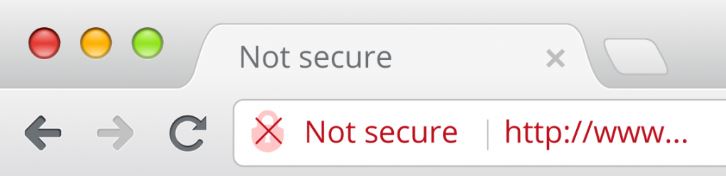
The network also prevents peer-to-peer communication with other devices on the network.
I received an error, what do I do?
- Maximum number of allowed devices reached (see the Device Management section for instructions to log out of a device.)
- Invalid username or password (see the Account Administration section for instructions to reset your password.)
- Payment processing errors (see the Billing section for how to update payment information)
How can I connect my gaming or streaming device?
For a game console that does not have a built-in browser, log in to MY ACCOUNT and click Device Management in the top menu. Enter the MAC address of the device in the "Add a Device" field and click the ASSIGN MAC button.
NOTE: For instructions on how to find the MAC address for your device(s), search online for each device model + “find MAC address.”
I'm having issues using my Xbox for live gaming. What can I do?
Xbox Help
When I try to connect to the PlayStation Network, I get an error code. What does this mean?
This block is done by Sony on their servers, and it is out of Viasat's support scope. Our attempts to gain more information from Sony's representatives have only provided what the error code means. Fortunately, the blocks have normally been lifted after 48 hours. While this is unofficial, this has been our experience.
Guest Lodging
Plans and services
What internet plans are offered at guest lodging facilities?
Some guest lodging facilities offer a 30-Day Enhanced buy-up plan that allows you to connect with download speeds up to 30 Mbps.
How many devices can I connect?
For the 30-Day Enhanced buy-up plan, you may connect up to 3 devices at a time.
Account administration
Will my goWiFi account work at other bases?
NOTE: Service options may vary depending on location. If your account has an existing subscription and you stay at a guest lodging facility, you will be able to receive the highest speeds offered at the guest lodging facility, up to the speed of your current plan. As an example, if you have a 60 Mbps subscription plan and you log in at a guest lodging facility, you will receive the highest speed offered at the lodging facility, not to exceed the speed of your current subscription.
Technical
What kind of security is available through my wireless connection?
Your connection is not secure if the URL starts with http or https and has an indication that the site is not secure like this:
The network also prevents peer-to-peer communication with other devices on the network.
I have a government laptop and can't connect to the goWiFi network. What can I do?
How can I connect my gaming or streaming device?
If your device does not have a built in browser, connect to the gowifi wireless signal with a different device. Once you reach the portal, click the Add Gaming or Streaming Device button and follow the instructions.
MWR
Plans & services
How much does the Internet service cost?
Do I need an account?
Technical
What kind of security is available through my wireless connection?
Your connection is not secure if the URL starts with http or https and has an indication that the site is not secure like this:
The network also prevents peer-to-peer communication with other devices on the network.
I have a government laptop and can't connect to the goWiFi network. What can I do?
How do I add my browserless device?
Still can't find the answers you need?
Send us a message 24/7
Or call us, if you prefer to speak to a Live Agent.


